Alexandra | 5/3/2024
So if you’re new here, welcome! Go glad to have you! Some things you should know: my son is autistic. He’s also a sensory-seeker and really likes watching videos and playing video games. We initially introduced him to gaming as a way to help improve his dexterity, as that was one of the categories he scored lowest in during his autism and occupational therapy evaluations. But we later found that video games can be super helpful for other aspects of his life, too.
YouTube is his go-to because he’s able to find colorful and engaging content that’s still quite educational. But, of course, we’re not the type of parents to just let run him loose on the interwebs. We supervise intensely and block any users/videos that we feel could jeopardize his innocence. That became more of a challenge once we gave him his own iPad rather than exclusively letting him watch his videos on the living room tv. So naturally, that left us wondering if there were any better options available for times when we couldn’t be available to directly supervise, like car rides or visits with relatives.
Enter video games.
My husband and I are both neurodivergent; he’s AuDHD and I’m ADHD. So needless to say, we’re no strangers to video games and the important purpose they serve to the neurodivergent brain. The challenge wasn’t getting him to play, it was finding games that we’d be cool with him binge-playing without the parent guilt.
At 4-years-old, we want to make sure that the stuff he plays doesn’t incorporate any violence or lewd acts, obviously. We also don’t want him to pick up on any crazy language. Because he’s a gestalt language processor, the latter is a huge priority because he doesn’t learn to speak by putting together individual words — rather, he learns and communicates fairly exclusively using entire phrases. And he doesn’t yet understand when it’s okay to say something and when something is inappropriate to say. He’s improving drastically each and every day, but he’s still building his vocabulary and learning how (and when) to properly use the words he knows.
And when we decided to homeschool our son, finding ways to keep him safely entertained and productive in terms of education became a challenge. So I began wondering if there was a way to combine his love for gaming, his need to build vocabulary, and his desire to experience color and movement with portability and our definition of video game safety.
And then it hit me like a sack of bricks — Minecraft.
It’s available on pretty much all newer gaming consoles you can think of (Xbox 360/PS3 and later). It’s also on iOS (which now supports game controllers) and Android. It works offline so it’s perfect for travel. Multiplayer isn’t automatic, so no worries of encountering other people who don’t play nice unless you’re in multiplayer mode. And while you do have to slay some mobs in the game’s normal survival mode, creative and peaceful modes both avoid those — and the mobs aren’t super creepy looking or gory when slain. But I’d err on the side of caution and save survival mode for age 6+ unless you know your learner can handle it. Try playing it for yourself to see what I’m talking about.
Minecraft is my favorite game, next to Animal Crossing (but that’s a different talk for a different post). I discuss my love for Minecraft lot in another post from April 2024, explaining the gameplay and benefits we’ve noticed in our son. Check it out here. I highly recommend it to parents — especially those with neurodivergent kids. But I didn’t deeply discuss the uses and benefits of Minecraft in education. So here ya go!
Biomes -> Geography, Biology, Social Studies, and more!
Geography & Biology
One of the amazing things about Minecraft is the biomes feature. According to my husband, biomes weren’t part of Minecraft back when it was first introduced in 2009. They actually didn’t make biomes a thing until October 2010. But regardless of when they got here… they’re here and are ready to build in!
Biomes are the different terrains available in Minecraft, meant to mimic what we’d see here in real life. Click here for more info on the biomes. I’ll provide a quick list of the current biomes (as of May 2024):
- Plains
- Ice Spike Plains
- Forest
- Birch Forest
- Flower Forest
- Dark Forest
- Bamboo
- Swamp
- Jungle
- Taiga
- Snowy Taiga
- Giant Tree Taiga
- Badlands (Mesa)
- Plateau
- Eroded
- Modified Plateau
- Wooded Plateau
- Modified Wooded Plateau
- Desert
- Savanna
- Ocean
- Deep Ocean
- Frozen
- River Delta
- Beach
- Mushroom Fields
- Mountains
- Extreme Hills
- Meadows
- Caves
- Deep Dark
- Dripstone
- Lush
- Snowy Tundra (aka Ice Plains or Tundra)
I’m sure I missed some but as you can see, there’s so many different terrain types to choose from. And that means tons of different lessons to have surrounding geography. You can focus on the features of the biomes themselves, like the weather, the animals found there, ground, etc. In the jungle biome, introduce the various jungles we have on Earth. In the desert biome, introduce real-life deserts.
You can also use these biomes to focus on the biology within each setting. You’ll find pandas spawn in bamboo biomes but not in desert biomes. Why is that? Plains biomes will have horses and cows but not camels. Ocean biomes will have significantly more wildlife than rivers and ponds. Swamp biomes exclusively have shallow ponds with opaque green water while other biomes feature water sources that are deeper and some shade of blue. How is that? Well, that’s for you to teach and your kiddos to learn!
Social Studies
Or you can take it a step further and connect the different terrains to the types of social structures you may find there and how they link to our world: the history of the Acatama desert and the original South American Acatama people, their culture, and their contributions to the modern-day world. The Cheyenne tribe, their culture, and lives across the Central US plains and mountains.
Those are just a few ideas — the awesome part about Minecraft is that you can let your imagination run wild and come up with your own lesson plan ideas! It’s important to notice the Minecraft’s default setting is to drop players in a random biome. To set a specific one, Google some seeds that contain your desired biome. You can also use this seed map site to learn more about an existing world and manually locate the different biomes. You might even find some interesting buildings or features to explore along the way! The seed map works best for users playing on PC, but we’ve had success using it on a Nintendo Switch. I’ll update once we try it on the iPad.
Recreation of Monuments
Now, this one isn’t one that we’ve done personally because our son just isn’t there yet (he’s just a wee boy!) But I definitely plan to incorporate this into our science and social studies/history curricula when he’s old enough.
I’ve learned that educators have been using Minecraft as a way to teach history by having students recreate historical monuments! Cool right? Now, Minecraft’s design is an 8-bit replication, so of course the structures will look blocky… but that also means that students can get creative with how they choose to display the key characteristics of these structures! Structures with arches can use a combination of blocks and stairs to mimic their curvature; castle tops can be made using brick textures. The possibilities are endless!
And the best part is that the natural placement of these monuments can be duplicated by searching for the proper biome using a seed. That means that pyramids historically set in the desert can be build in desert biomes in Minecraft. The Washington Monument can be built in a plains biome. The Eiffel Tower can be built in the flower forest biome… oh là là! Très romantique!
There’s a plethora of tutorials available on YouTube and across the interwebs. Check them out and try some builds yourself!
Interactions with Villagers -> Economics!
While Minecraft doesn’t have it’s own version of currency, it does have an active barter system in place. It comes most in handy when in survival mode, but players can technically trade with villagers in creative mode. The quality of the trades depends on the level of the villager, and leveling up villagers requires players to trade with them frequently. So it’s a mutually beneficial relationship… kinda like in the real world, yes?
Players can trade villagers for a variety of items, and they’re typically biome-related in some way. Plains villagers will have plenty gardens and chests full of bread, potatoes, and other veggies. You’ll also find some helpful supplies, like iron, tools, and maybe even a rare emerald. Their villagers are great for beginners to trade with. Snowy taiga villagers have a harder time farming because of the cold weather, so their gardens will likely be bare and their chests fairly devoid of food. They’re a bit harder to trade with and level up. But it’s still very possible with a plan and some skill!
Each villager has an item they ask the player to give them in exchange for another item, typically something the player can use to craft a helpful object. As the villager levels up, the player can trade for rarer, harder to find materials. The villagers also have professions that determine the type of materials they have to trade — just like specialty stores in the real world!
Trading can not only help teach the basic functions of an economy, but it can also provide a visual aid to the value of an item. “Prices” for items available for trade vary according to availability and demand, just like in our economy. Villagers offer different prices according to their individual supply and demand needs, just like in our economy. However, because the villagers aren’t in competition with each other, their prices vary drastically and only are impacted by the player’s interaction with them. There’s no “market value” so to speak. There also isn’t negotiation — what you see is what you pay! But there is a little discount for repeat customers and those who fight in favor of the village… 😉
Multiplayer -> Communication Skills & Teamwork
While there is online multiplayer, we choose to use the split-screen function to play with our son. My husband and I already enjoy playing Minecraft, so jumping into our son’s world and building with him is a no-brainer!
When we play together, we’ll frequently direct him on how to craft certain things, where to place blocks, and how to accomplish objectives. These instructions are great help for him as a child with autism. Firstly, they help him with understanding, organizing, and prioritizing tasks — something many people with autism struggle with. And using directionals in our commands (like “move the block to the left,” or “delete the block on top of the red one” can help ease directional dyslexia, another issue many auties struggle with.
Us communicating with him verbally during all of those exchanges not only allows us to bond, but it gives him a chance to hear more words and phrases to add to his vocabulary. As a gestalt language processor, constantly giving him new words and phrases is essential to his speech development.
Subtitles and On-screen diction -> Reading and Language Arts!
This one is especially important for our family because our son is hyperlexic, meaning he can read extremely well for his age. He essentially memorizes every word he comes across — similar to a child memorizing sight words. Except he can memorize bigger words that the average child may not know — like construction, concrete, enchantment. It’s wild.
Minecraft is a great way to practice reading because words are literally everywhere. Anytime you switch tools, words appear on the screen telling you which item you’ve switched to. As you scroll down or hover over items, Minecraft has a label on-screen telling you what the item is. The game even has a feature where it can verbally read off sentences — like error messages or instructions. These sentences are also on the screen, so readers can associate the words they’re hearing with the words they see on the screen. These features are excellent for someone learning how to read!
Even if your learner isn’t ready for reading, Minecraft still can help with learning the alphabet. Something my letter-obsessed baby loves to do is build the alphabet in creative mode. He uses blocks of his favorite colors and gets straight to work! It’s awesome to watch him outline everything then go back and fill it all in. He’s quite the architect 🙂 Speaking of designing…
Crafting -> Building, Design, Engineering, even Physics and Coding!
Building & Design
Minecraft features a lot of the latter part of it’s title: crafting.
In survival mode, the whole object of the game is for players to craft items using materials that they find naturally or loot during world exploration. Those items can then be used for survival or for building/crafting other things. Living quarters (which you kinda need in survival mode), contraptions/simple machines, even mob-powered material farms… the possibilities are endless.
Creative mode is just that — a way to be creative! Players can build just about anything they choose. My son’s special interest is Mickey Mouse, specifically Mickey Mouse Clubhouse. When we’re not learning, he spends his spare time looking up Minecraft tutorials and building his own Clubhouse World. He likes experimenting with the different in-game textures and building materials.
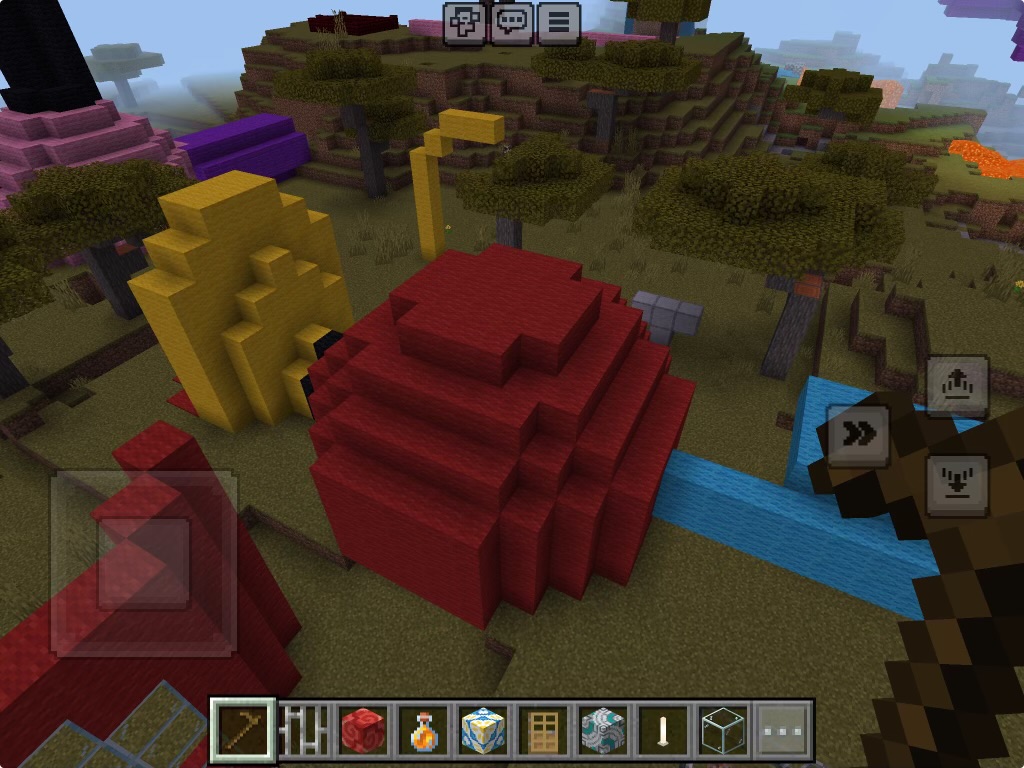
But there’s also a plethora of texture packs available in the Minecraft store. These textures alter the existing blocks’ appearance to fit a theme. We’ve bought the modern texture pack. It’s my favorite to date! Our son also likes playing with the Mario and Sonic texture packs, as they offer up different colors and materials to build with — and they even have their own little built-in mini games!
Coding
Speaking of in-game edits, coding is a thing in Minecraft! Players can create and add code scripts in the Java Edition of Minecraft (available on PC only). Here’s a great free lesson to teach JavaScript.
Engineering
And in reference to those mob-powered farms, the engineering skills needed to build one of those puppies is beyond anything you’d ever expect in such a simple game. I’ve never personally attempted such a feat, but I’ve watched many a YouTube video about people who make them. Making them in creative mode is a challenge in and of itself… but making one in survival mode is a whole other story. There are guides online. But if you’re a real-life engineer, I challenge you to create one on your own. Come back and tell us how it went! 🙂
My point is… Minecraft takes a considerable amount of thought for you to really progress. There aren’t any explicit instructions for gameplay. You have to think logically. But once you get in the mindset of an engineer, you’ll go far in the game.
Physics
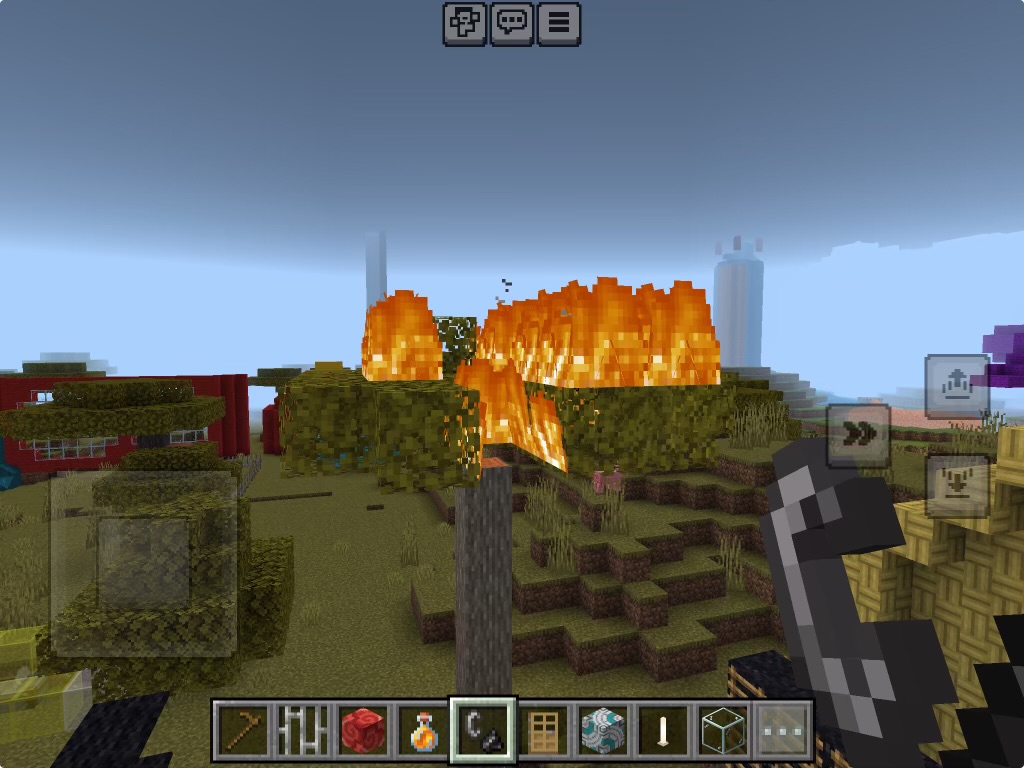
Pretty much all blocks in the game stay right where you put them, but several of them function using realistic physics. Water and lava flow in the game, with the former flowing faster than the latter. Flowing water eventually fizzles out when it’s far from its source; rushing water can whisk players away. Stone hardiness varies according to the type; cobblestone breaks much more easily than obsidian in survival mode, just as in real life. Sand, gravel, and dirt take no time to shovel through, whereas sandstone takes more effort to move. Water and fire cancel each other out; water and lava can make either cobblestone or obsidian. Fire spreads on grass and in trees, but extinguishes itself on stone. All reactions you’d expect to happen in the real world.
Tools in survival mode also have a limited number of uses, just like they would in real life. A regular stone pickaxe lasts significantly less uses than an iron one. Diamond armor holds up much longer than gold armor. Seems logical.
These are all just basic physics rules, but they can help learners better understand and digest the real world around them by showing them a digital version of it that they can see rather than experience… if that makes sense. Seeing fire spread through the savanna and burning up grass and wooden trees in the game can help players understand the consequences of those actions in real life without having to experience it first hand. Useful information, that is.
Keep in mind, though, that Minecraft is a game first and an educational tool second. That said, rain does not extinguish fires, and certain blocks are impervious to gravity. In fact, most blocks are. But there are a select few, like sand and gravel, that do fall when the blocks beneath them are removed. And those falling blocks can spell trouble for players… so watch out. And remember: never dig straight up or down!
Additional Online Resources
There’s also an Education Edition of Minecraft available for instructors everywhere with tons of lesson plans available! Take the dive and search, or start here. Some are free, others cost, on top of the cost to purchase the game itself. All are great resources for homeschooling. And I highly recommend them.
If you choose to try any of the online Minecraft resources for educational purposes, come back and tell us below what you think!
About the Author

Alexandra is the founder of the ‘Tism Things platform and owner of online business The Shop by ‘Tism Things. A proud stay-at-home wife and mama to two amazing, smart, and empowered littles, Alexandra frequently spends her time learning about autism and ADHD, its effects on families and caregivers, and ways to support individuals with either or both conditions. Driven by her son and husband’s autism and ADHD diagnoses, Alexandra prides herself on employing creative methods to adapt her household into one that welcomes people of all neurological types, aiming to foster a sense of inclusivity, understanding and acceptance among anyone’s path she crosses.
When she’s not in a ’tism rabbit hole on the internet or playing with her babies, she’s likely out shopping, cooking something yummy, helping out her grandparents, or out in the garden trying to keep her plants alive in this Georgia heat. Honestly, probably that last one.
 'Tism Things Blog
Sound off!